There is simply no telling how much money Union County Sheriff’s Sgt. Bob Calamari’s free scam awareness classes have saved local seniors, but the information provided is nonetheless priceless.
That’s why seniors and their loved ones should go ahead and mark their calendars to attend the next class on Wednesday, Aug. 20, at 10 a.m. inside the Union County Public Library located at 303 Hunt Martin Street in Blairsville.
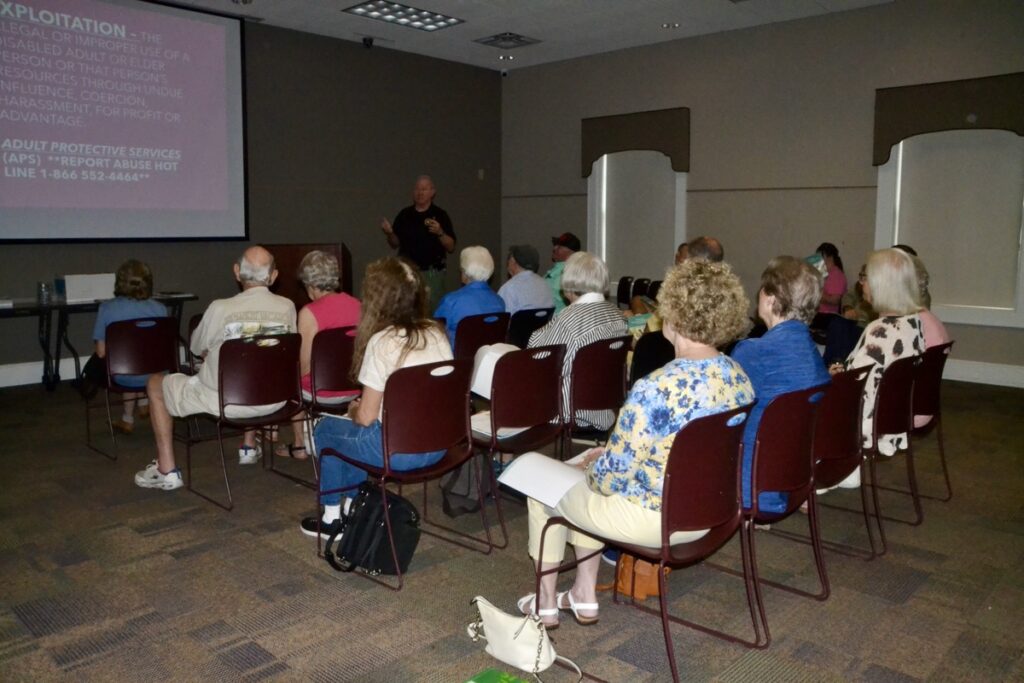
The Sheriff’s Office has committed to regularly educating members of the public on how to protect themselves from scams, and the upcoming class will be the second public scam class this month, with the first having taken place last Wednesday, Aug. 6, also at the library.
And now, with added help from Cassie Gray of Tri-State Tech Support, class attendees are learning how to take further measures when it comes to cybersecurity.
Outfitted with a slideshow, informative documents and a handy booklet courtesy of the Georgia Attorney General’s Office, Calamari’s classes serve to educate and remind attendees of the dangers lurking behind computer screens, on the other end of phone calls and even in mailboxes.
The unfortunate thing about criminal pursuits, however, is that they’re always evolving, and that is part of why Calamari schedules his scam classes so often throughout each year.
Last Wednesday, Calamari touched on the nature of the problem, using his personal attempts to thwart fraudulent contact as an example. His home phone line can receive an influx of “spam calls” on a Monday, prompting him to take action to protect the number and receive none on Tuesday. By Wednesday, however, the line is blowing up again.
It’s not that sites like www.donotcall.gov don’t help. Rather, scammers are always looking for ways to get around blocks, whether that means changing their numbers or “spoofing” existing ones. It’s for this reason that a heavy dose of caution should be practiced when answering any calls, even from trusted numbers.
“Scammers can make any number or name appear on your caller ID. Even if your phone shows it’s your bank calling, it could be anyone,” warns the Scam/Fraud Awareness Handout that Calamari includes as part of the course.
With advancing AI technology, voices can also be replicated. This has resulted in a rise in cases where victims believe they are being contacted by children, grandchildren or other loved ones who are allegedly stuck in vulnerable situations and need money to get out.
The best thing to do after receiving a distressing call, Calamari says, is to call that family member or friend directly and check on them. More often than not, they will answer and be just fine, and the mind will be put as much at ease as the savings account.
On that note, computers are a veritable hornets’ nest when it comes to identity threats and con opportunities, but just like phones, a lot of these dangers can be avoided with a little education and common sense.
This was where Gray stepped in. As a computer and phone repair technician, she works as an office manager at Tri-State Tech Support and so has seen her share of data erasures, the cleaning out of life savings and other “heartbreaking” cases.
“I’m here today to share some steps we can all take to achieve some peace of mind in our digital lives,” Gray said at the start of her portion of the presentation, inviting anyone who wanted a copy of her notes to come by the office; she’ll be happy to put them on a thumb drive for future reference if it means making the difference in someone’s safety.
“Our passwords are the first and most important line of defense in our digital lives,” Gray revealed, kicking things off by talking about the organization and safe handling of passwords.
The general recommendation is to make passwords complex with a mix of capital and lowercase letters, numbers and symbols, as well as keeping different passwords for different accounts.
Unfortunately, that usually seems unfeasible with the number of accounts most people have for the number of digital services the modern world provides.
It’s not safe to simply keep a document listing all personal passwords on a computer, and keeping physical copies in a notebook comes with its own set of risks and hassles.
Gray suggests utilizing a password manager, which is “an encrypted vault that stores all of your passwords for you, so you only have to remember one master password.”
Luckily, some browsers, such as Google Chrome, come with their own password managers. Standalone applications also exist for the same purpose, and Gray recommends using Bitwarden and 1Password. Still, passwords should be changed frequently, and if any account offers two-factor identification, sign up for it.
Speaking of internet browsers, they can make a difference in how people experience the web, but none appear to be inherently “bad” when it comes to safety. It depends more on user preference.
Google Chrome, for instance, provides excellent search results but collects data for curating advertisements. DuckDuckGo, meanwhile, is the inverse in that it’s great for maintaining privacy, but its search engine can be more likely to give wrong or downright malicious results.
Two things Gray and Calamari both endorse are protecting phones and computers with passwords or pins, and also never giving in to the emotional responses that scammers often try to elicit. Instead of panicking, contact the Sheriff’s Office at 706-439-6066 or Tri-State Tech Support at 706-994-6183.
Much more information was presented last week than can be printed herein, so to get the full experience, please attend the Aug. 20 class at the library.